Procedures related to post-award administration of Research Fund:
Cost Recovery Payments
The intent of this document is to define the procedures using Record Cash Sale task (cheque payment) or Create Ad Hoc Bank Transaction task (EFT/wire payment) for Grants in Workday. Cost Recovery Payment is a payment to recover costs charged against the Grant, which is not from the Sponsor under the terms of the award agreement. This payment will be credited to the corresponding expense recovered.
This is not to be confused with Cost Reimbursement billing in Grants module, where the payment is from the Sponsor of the award for an invoice sent in accordance with the award agreement. An example would be an award agreement that stipulates invoicing to Sponsor is based on the actual expenses incurred for a certain period.
Procedures
Record Cash Sales task to deposit cheque cost recovery
1. Faculty/Department Finance Staff initiates the cheque deposit by following Record Cash Sale job aid.
Provide the following information for the Grant:
Customer: Miscellaneous Cash Receipts
Revenue Category: Unearned Revenue
Grant: Grant ID
Memo: Indicate the grant #; expense ledger account & spend category
Attach supporting documentation (e.g. scanned copy of the cheque and other supporting documents) on the Attachments tab
2. Transaction routes to the assigned Research Finance Officer (RFO).
3. RFO reviews the transaction and approves if everything is in order or sends back if further information or documentation is required.
4. Faculty/Department Finance staff prepares accounting journal to reclassify unearned revenue to the appropriate spend category
For salary cost recovery, use journal source “7-Payroll Accounting Journal” and select the appropriate spend category (e.g. Salaries | Student Bachelor Domestic) on the Spend Category field & select the employee name on the Additional Worktags field).
For non-salary cost recovery, use journal source “1-Campus Manual”
Create Ad Hoc Bank Transaction task to record EFT/wire cost recovery
Only Research Finance can perform this task by following the Create Ad Hoc Bank Transaction job aid
The Faculty/Department Finance Staff requests the research finance office to record the EFT/wire payment by sending the following information to RF’s email address – AR@finance.ubc.ca:
- Deposit reference # (from outstanding wire payment listing)
- Amount
- Grant ID
- Spend Category for Cost Recovery
- Documents related to the payment
Delegation of Grant Manager Role Signing Authority for Grants
Delegation of Research Spending Responsibility to UBC Staff or Faculty Member - UBC Research Policy LR2 allows for UBC Researchers given Research Spending Responsibility for a UBC research account to delegate their authority to approve expenditures from such research account to another UBC staff or faculty member provided that their Department Head is notified in writing of the delegation. For clarity, any UBC Researcher with Research Spending Responsibility who delegates authority will continue to be responsible for ensuring all transactions in such research account, including all expenditures approved by the person(s) with delegated authority, are fully compliant with Funding Terms, UBC policies and any other applicable requirements.
There are 2 groups where you can delegate signing authority:
A. Delegation to UBC staff or other faculty members
- Delegation by PI in Workday (click here to visit Workday Grant-Related Security Role Assignment as a Principal Investigator Knowledge Base)
- Delegation by grant role administrator in Workday (click here to visit Workday Grant-Related Security Role Assignment Using Assign Roles)
B. Delegation to a Contingent Worker who is a non UBC staff or faculty member
- Complete the Contingent Worker Delegation Approval Form with assistance from your Department/Unit to obtain the required approval signatories
- Submit the completed form to the ISC team
(ISC team will connect with RFO to obtain VPRI’s signature on the Contingent Worker Delegation Approval Form)
Research Participant Payment Guidelines
Purpose
To define the parameters when paying research participants in accordance with UBC Policy 89/LR9 – Research Involving Human Participants.
Guidelines
The Principal Investigator (PI) ensures that research participants are compensated as per Research Ethics Board (REB) approval and their identities are kept confidential.
Research participants who receive more than $500 in one calendar year will be issued T4A to comply with Canada Revenue Agency (CRA) regulations.
Depending on the nature of research, number of research participants, type and amount of payments, the payment methods are as follows:
pay from petty cash fund
issue cheque or EFT directly to research participants
PI or delegate requests a cash advance to pay research participants or purchase gift cards following REB approval
The amount paid to research participants per calendar year determines the ledger account and spend category in recording the payment:
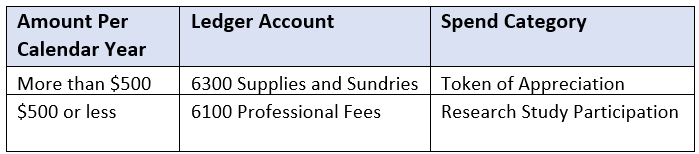
The PI is responsible in ensuring that all documents related to research participants payment are kept and available for audit purposes.
Procedures
- Faculty/Department Finance Staff creates expense claim either through submitting an Expense Report or a Supplier Invoice Request.
- In the Memo field of the expense claim, include the grant number, the phrase “Research Study Participant Payment” and a brief description of the study.
- Supporting documents must validate the movement and final use of the funds.
- Create and Reconcile Cash Advance
- Cash Advance:
- To request for cash advance, search for “Create Spend Authorization” task in Workday.
- Complete the online form by following the step-by-step instructions on KB0016803 Request a Cash Advance or Spend Authorization Knowledge Base.
- On the Description field, enter the grant ID and “Cash Advance for Research Study Participant Payment”.
- On the Justification field, enter the nature of the project for the research study participant payment, estimated number of participants and amount per participant.
- Reconciling Cash Advance:
- Search for “Create Expense Report” task in Workday.
- Complete the online form by following the step-by-step instructions on KB0017174 Create an Expense Report to Reconcile Cash Advances Knowledge Base.
- Cash Advance:
- Create Supplier Invoice Request
- Search for “Create Supplier Request” task in Workday, if the research study participant is not already an existing supplier in Workday and submit the request. Otherwise, skip to the last bullet point below.
- Complete the online form by following the step-by-step instructions on KB0016683 Create Supplier Request Knowledge Base.
- Search for “Create Supplier Invoice Request” and follow the step-by-step instructions on KB0016740 Create, Edit, Change or Cancel a Supplier Invoice Request Knowledge Base